![Black text & Blue Icon.jpg]](https://help.benchworks.elentra.com/hs-fs/hubfs/Black%20text%20%26%20Blue%20Icon.jpg?height=40&name=Black%20text%20%26%20Blue%20Icon.jpg)
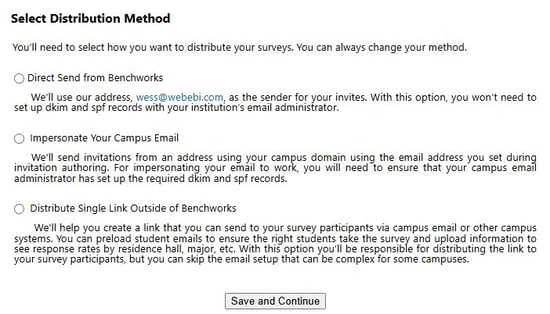
The first time you access Manage Survey for an order, Benchworks asks you to choose how you want to distribute your survey. You must select one method before continuing, but you can change it prior to your launch.
Your choice determines who distributes the invitations, whether your campus IT team needs to complete email setup, and how participants access the survey.
Compare Your Options
| Direct Send from Benchworks | Impersonate Your Campus Email | Generate Survey Link | |
| Who distributes the survey | Benchworks | Benchworks | Your institution |
| How participants access the survey | Individual email invitations | Individual email invitations | One shared link |
| What participants see as the sender | Your chosen sender name with a Benchworks email address | The campus email address entered during setup | Determined by how your institution shares the link |
| Campus email setup | No configuration required | Campus IT must configure the required email-authentication records | Not applicable; no email is sent by Benchworks |
| What to consider | Requires the least setup from your institution | Requires coordination with campus IT before launch | Your institution manages distribution and outreach |
Direct Send from Benchworks
Benchworks sends invitations from the Benchworks email address (wess@webebi.com). The sender name you choose appears in the participant’s inbox.
This method doesn't require your campus email administrator to configure DKIM or SPF records, making it the option with the least institutional setup.
You will still complete the applicable survey setup tasks, including uploading participants, entering invitation and reminder content, and setting survey dates.
Impersonate Your Campus Email
Benchworks sends invitations using the campus email address you enter during invitation setup. Before you use this method, your campus email administrator must configure the required email-authentication records.
Your IT team must add our SPF records to your email server for this distribution method to ensure proper authentication and delivery. Allow enough time to coordinate with your IT team and test email delivery before your planned launch.
For more information, review How to Ensure Email Deliverability.
Generate Survey Link
This option appears as Distribute Single Link Outside of Benchworks on the selection screen.
Generate one link and share it through your own channels, such as campus email, a website, a campus portal, or a QR code. Your institution is responsible for sending invitations and reminders.
You choose who can respond:
- Anyone: Anyone with the link can access the survey. Participants will be asked to provide their name and email address.
- My list of participants: Only people whose email addresses appear on your uploaded participant list can access the survey.
Changing Your Selection
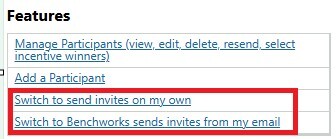
To change your distribution method before launch, open Manage Survey and go to the Features section in the lower-left corner. You can then choose one of the other available methods.
Questions?
If you have questions about these options or need help changing your selection, contact Benchworks Support at benchworkssupport@elentra.com.